Moving your US stocks into Binance: what a DTC transfer needs, and why it gets rejected
No need to sell: your old broker hands the shares straight to Alpaca. Copy the receiving details exactly and make sure your name matches on both sides: even a missing middle name can bounce the request.
Your shares are sitting at another broker and you'd rather hold them on Binance. You don't necessarily have to sell and buy them back. Binance's Help Center lays out a DTC transfer route: your current broker delivers the shares directly to the clearing broker Binance works with. It's a route that's unforgiving about details. If the name, account number, symbol or quantity doesn't match the other side's records, the request can be sent back.
One thing to settle before you start: whether you can trade stocks on Binance depends on where you live and whether your account is eligible. If it isn't, the transfer form further down won't help you.
What Binance accepts: stock transfers through DTC
The Help Center article "How to Transfer Stocks Into Binance (DTC)?" says Binance supports stock transfers that follow the Depository Trust Company (DTC) process. A DTC transfer is an electronic transfer straight from one broker to another: both the delivering and the receiving broker have to be DTC members, and the two sides coordinate delivery and receipt manually.
The receiving party you enter isn't "Binance". The help page says Binance partners with Alpaca Securities LLC to carry out DTC transfers, and on the fee page, the clearing and custody firm behind stock trading on Binance is also Alpaca Securities LLC. The receiving broker you name at your current broker is Alpaca.
So before you submit anything, ask your current broker whether it's a DTC member and whether it can send a transfer out via DTC. It may also charge an outgoing transfer fee, which varies by broker, so ask about that too.
At your current broker: copy the receiving details field by field
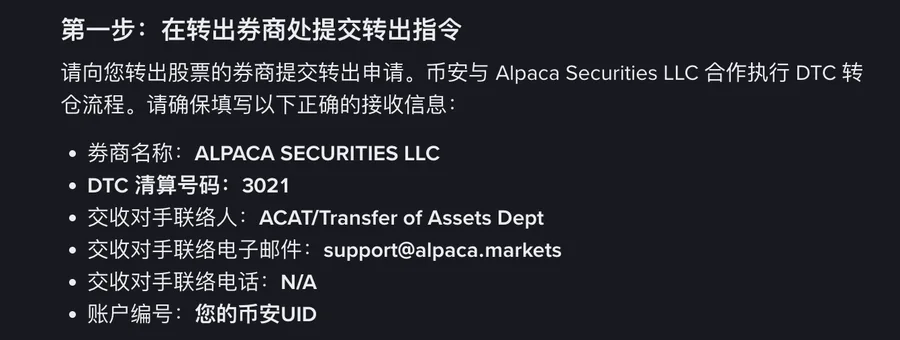
Step one on the help page is to raise a transfer-out request with the broker you're moving the shares from, using this set of receiving details:
| Field | What to enter | Watch out |
|---|---|---|
| Broker name | ALPACA SECURITIES LLC | Not Binance |
| DTC clearing number | 3021 | Binance's submission page also shows Alpaca's DTC details, so you can check one against the other |
| Counterparty contact | ACAT/Transfer of Assets Dept | The department name contains "ACAT". Copy it as is, and don't switch to an ACATS transfer because of it |
| Counterparty contact e-mail | [email protected] | Copy as is |
| Counterparty contact telephone | N/A | N/A is what the help page gives; no need to hunt for a number |
| Account number | Your Binance UID | Not your account number at the old broker |
Once that's in, there are two more things you need to have in hand:
- Settlement instructions (SSI): the help page describes these as the details that tell the DTC network exactly where to deliver the shares. Keep a screenshot of them: the symbols and quantities you enter on Binance later have to match. The help page doesn't say which side you get the SSI from, so ask when you submit the transfer-out at your current broker.
- Proof that you own the delivering account: a screenshot from the delivering broker showing your full legal name and your account number there. It's what confirms that the sending and receiving accounts belong to the same person.
Back on Binance: Funding → Stock Transfer → Transfer In
The entry point is [Funding] - [Stock Transfer] - [Transfer In]. The page shows your account details and Alpaca's DTC information; fill in the delivering-side fields to match your account records at your current broker.
When you choose the stocks and enter quantities, four limits apply:
- only stocks Binance supports can be transferred;
- there can't already be a transfer in progress for the same symbol, so if you want to move one stock in two batches, wait for the first to finish;
- whole shares only;
- up to 50 stocks per request, so a portfolio of more than 50 names won't fit into one submission.
Enter each symbol and quantity exactly as they appear in the SSI, then upload the required documents. Have the account screenshot from the previous step ready before you get here.
What comes across is the stock itself, cleared and held in custody by Alpaca. That's a different thing from the tokens that trade around the clock in spot; for how the two differ, see bStocks vs real shares, and swapping between them.
Why transfers get rejected: even a missing middle name counts as a mismatch
The help page says name matching is strictly enforced: if the legal names differ in any way, including a missing middle name or an initial, the transfer may be rejected. On top of that, if the name registered on Binance doesn't exactly match the name on your delivering broker account, you'll need to submit a valid government-issued ID for identity verification. So do both: get the names to match before you submit, and if that really can't be done, have a government-issued ID ready.
Go through this line by line before you submit:
| What you prepare | Has to match | If it doesn't |
|---|---|---|
| The registered name on your Binance account | The full legal name on your delivering broker account | Plan as if it will be rejected; if the names really differ, you'll need to submit a government-issued ID |
| Screenshot of the delivering account (name + account number) | The delivering-account details you enter on Binance | The screenshot doesn't prove both accounts have the same owner; that counts as incomplete or incorrect information, and the request is rejected |
| Account number (Binance UID), DTC number 3021 | The receiving details on the help page | Any discrepancy causes the transfer to fail |
| Symbols, quantities | The SSI | Same as above: the transfer fails |
| Holder of the delivering account | Holder of the receiving Binance account | DTC rules don't allow third-party transfers, so shares held in someone else's name (family included) can't be moved into your account |
How long does it take, and what does moving out again cost?
DTC transfer requests are processed in daily batches, Monday to Friday at 07:00 UTC. For completion, the help page says to allow at least 14 business days from the processing day, and that the timeline depends heavily on each broker's processing speed. When you plan around it, keep in mind:
- the clock starts on what the help page calls the processing day, not the moment you hit submit;
- 14 business days leaves out weekends and holidays, so it's roughly three calendar weeks or longer, and the help page still words it as "at least";
- both brokers sit in the chain, so if your old broker is slow, the whole transfer is slow.
During review, once both brokers have verified everything, the request is processed through DTC, and the final status reaches you by email and/or in-app message.
If you later want to move the shares on to another broker, the fee page as of September 2026 reads: DTC transfer out costs $150 per stock, per submission, with a note on the DTC transfer-out line that ACATS isn't supported. Moving 3 stocks out in one submission, for example, comes to 3 × $150 = $450. The fee table says it applies to Direct Equities only; trading fees are covered separately in our breakdown of Binance's US stock fees.
Factor that exit fee in before you decide to move at all, along with the other trade-offs in Binance vs traditional brokers for US stocks. Also note that the help page itself says its content is for general information and educational purposes only and may be outdated; the legal terms for securities trading are in the Terms of Use and the Securities Trading Product Terms.
Frequently asked questions
Do I have to sell my shares before moving them to Binance?
No. A DTC transfer moves the shares themselves: your old broker delivers them to Alpaca Securities LLC. For this route to work, all of these must be true: your old broker is a DTC member, the symbols are supported on Binance, you're moving whole shares, and your account is eligible for stock trading on Binance.
Why does the account number field take my Binance UID?
The receiving broker is listed as Alpaca Securities LLC, not Binance, and in the set of receiving details on the help page, the account number is your Binance UID. Entering your old broker's account number, or any other number, is a mismatch and the transfer will fail.
My name at my old broker has no middle name, but my Binance verification includes one. Can I still transfer?
The help page counts this among the name differences that can get a transfer rejected, so plan as if it will be. Before submitting, ask your old broker whether the legal name on the account can be changed to the full form that matches Binance. If it can't, have a valid government-issued ID ready: Binance asks for one for identity verification when the two names don't match exactly.
What will it cost to move the shares from Binance to another broker later?
It's charged per stock, per submission: moving 5 stocks at once is $750, and splitting one stock across two submissions means two $150 charges. The fee page also notes on that line that ACATS isn't supported. Fee tables can change, so check the figure on the fee page at the time you actually transfer out.
Official pages on stock transfers
The English Help Center page was published on 2026-08-04.
- Binance Help Center: How to Transfer Stocks Into Binance (DTC)?
- Fee page: Binance stock fee schedule